Flights
Flight charts, pilot stats, a searchable flight log with FlightAware detail panel, a route map and printable pilot report, plus bulk import and export.
Overview
The Flights page on the web dashboard gives you a full picture of your group’s flying history — activity charts, per-pilot stats, a searchable log with FlightAware-powered flight tracks, an interactive map of every route flown, a printable per-pilot report, and bulk import and export of flight data.
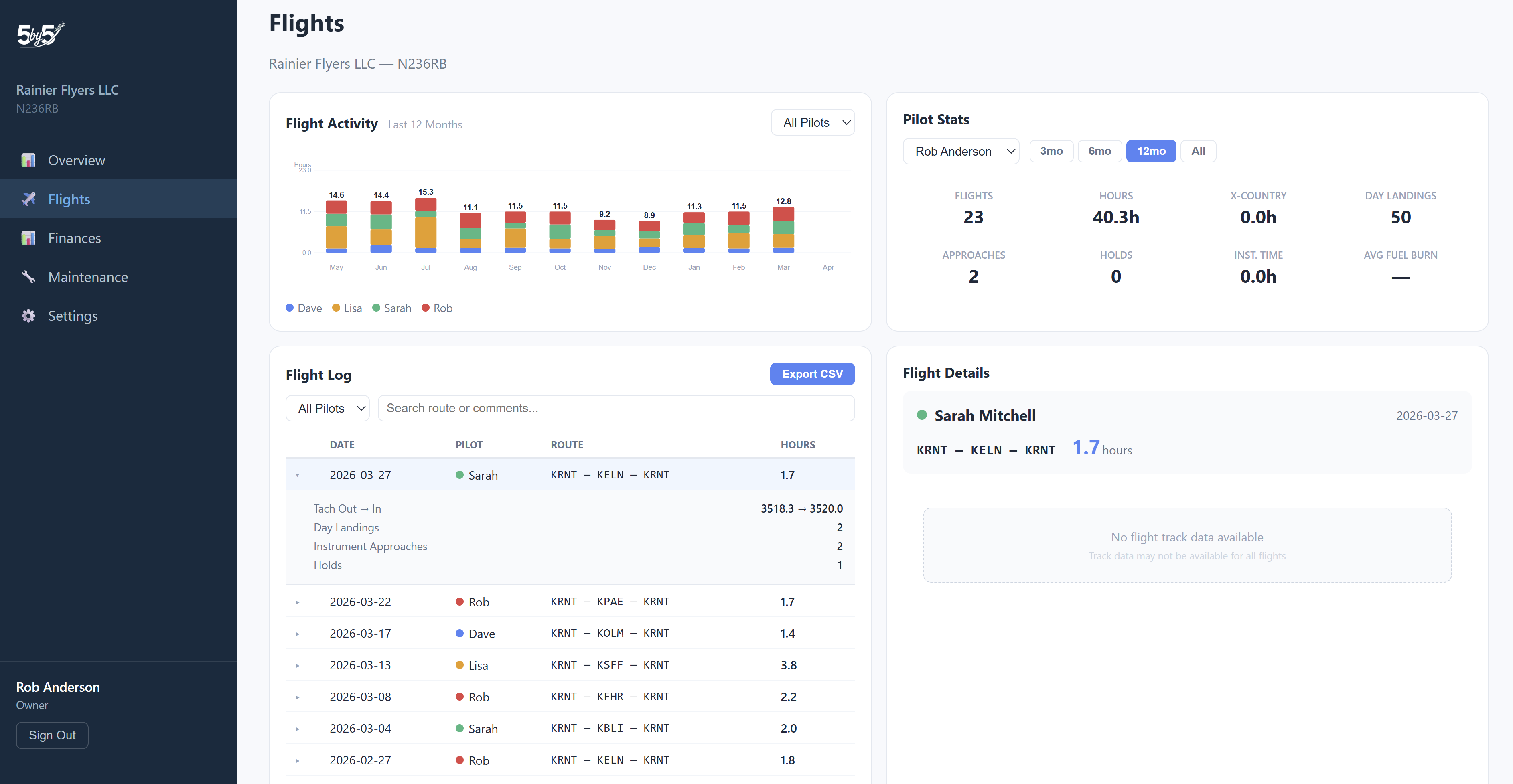
Flight Activity Chart
A stacked bar chart showing the last 12 months of flight hours broken down by pilot. Each pilot has a unique color, and the legend identifies who’s who.
Use the pilot filter dropdown above the chart to focus on a single pilot or view the whole group together.
Pilot Stats
Select any pilot from the dropdown to see their statistics over a chosen time range (3 months, 6 months, 12 months, or all time):
- Total flights and hours
- Day and night landings
- Instrument approaches
- Night flying hours
- Cross-country hours (any flight with a landing more than 50 NM straight-line from takeoff)
This is useful for reviewing a member’s recent activity or checking currency ahead of a flight review.
Flight Log
A paginated table of all logged flights, with columns for Date, Pilot, Route, and Hours.
Filtering:
- Pilot — filter to a specific member’s flights
- Search — filter by route or comments
- Date range — restrict to a specific window
Click any row to expand the full details of that flight — tach times, landings, instrument approaches, oil added, fuel, and any squawks or comments. At the same time, the flight detail panel on the right loads a FlightAware view for that flight, showing:
- A map of the actual route flown
- An altitude profile chart tracking the flight’s altitude over time
- A speed profile chart showing groundspeed across the flight
How the FlightAware Match Works
The detail panel pulls data from FlightAware based on the aircraft’s tail number and the flight date.
For the cleanest results, log each leg as its own flight. FlightAware records every leg of a trip as a separate flight (KRNT → KOLM is one record, KOLM → KRNT is another — there’s never a single “KRNT-KOLM-KRNT” record). The matcher works best when your log entries mirror that structure: one departure airport and one destination airport per entry.
When multiple FlightAware records exist for a tail on the same day, 5-by-5 uses this matching strategy:
- Exact leg match — find the FlightAware record whose origin and destination match the first and last airports on your log entry. Most reliable when your entry is a single leg.
- Multi-leg log fallback — if you logged a multi-leg trip as one flight (e.g., KRNT-KOLM-KRNT), 5-by-5 picks the leg whose origin matches the first airport on your route, typically the outbound. The return leg’s track won’t appear unless you log it separately.
- Closest-by-date fallback — if neither of the above finds a match, 5-by-5 falls back to the FlightAware record closest in time to your logged date.
If you flew two separate flights on the same date with similar routes, the matcher uses your logged route to pick the right one — edit the route on a log entry to disambiguate if it picked the wrong one.
When there’s no FlightAware data, the panel will say so. The most common reasons:
- The aircraft wasn’t ADS-B Out (or Mode S) equipped at the time of the flight, so the public ADS-B network had nothing to pick up.
- Local receiver coverage was thin — common at remote fields or at low altitude in radar-shadow areas.
- The flight pre-dates FlightAware’s history window.
VFR vs. IFR status doesn’t affect coverage — FlightAware tracks GA aircraft via ADS-B and Mode S transponder data, not whether you filed a flight plan.
Tip: The FlightAware match is a best-effort visualization. The authoritative record is the flight log entry itself — what you typed, ADS-B-prefilled, or imported. If a FlightAware view shows different airports or times from your log, trust the log.
Flights Map
Click the Map sub-tab at the top of the Flights page to see every leg flown by your group rendered on an interactive map. Each leg is drawn as a great-circle line between airports, colour-coded by pilot so you can see at a glance who’s been flying where.
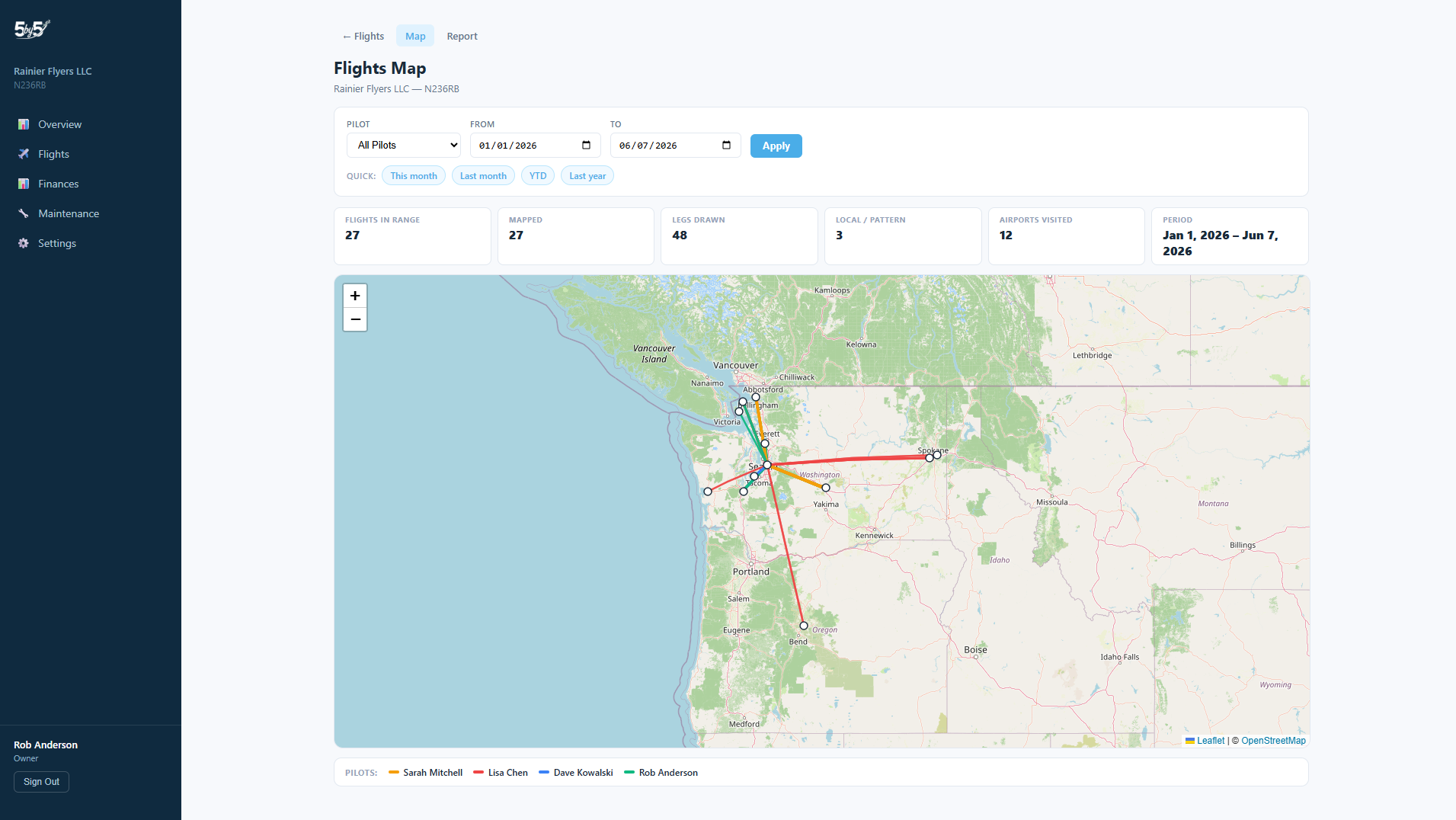
Filters at the top:
- Pilot — focus on a single member’s flights. Owners and admins can pick any pilot or “All”; non-admins see only their own.
- Date range — restrict to a specific window with quick presets for This Month, Last Month, YTD, and Last Year, or set custom from/to dates.
On the map:
- Each leg is a great-circle polyline between departure and arrival airports
- Frequency-weighted thickness — routes flown more often appear bolder
- Click any line for a popup showing the pilot, date, and hours for that flight
- Airport markers display ICAO codes on hover
The summary bar above the map counts what you’re seeing: total flights in range, how many were mapped, how many were local / pattern flights (those don’t draw a line), and how many separate airports were visited.
If a route references an airport not in the airport library yet, it’s listed in the footnote below the map so you know exactly what’s missing.
Pilot Report
Click the Report sub-tab at the top of the Flights page to generate a printable summary of a pilot’s flights over any date range. Useful for flight reviews, training records, insurance audits, and end-of-year personal records.
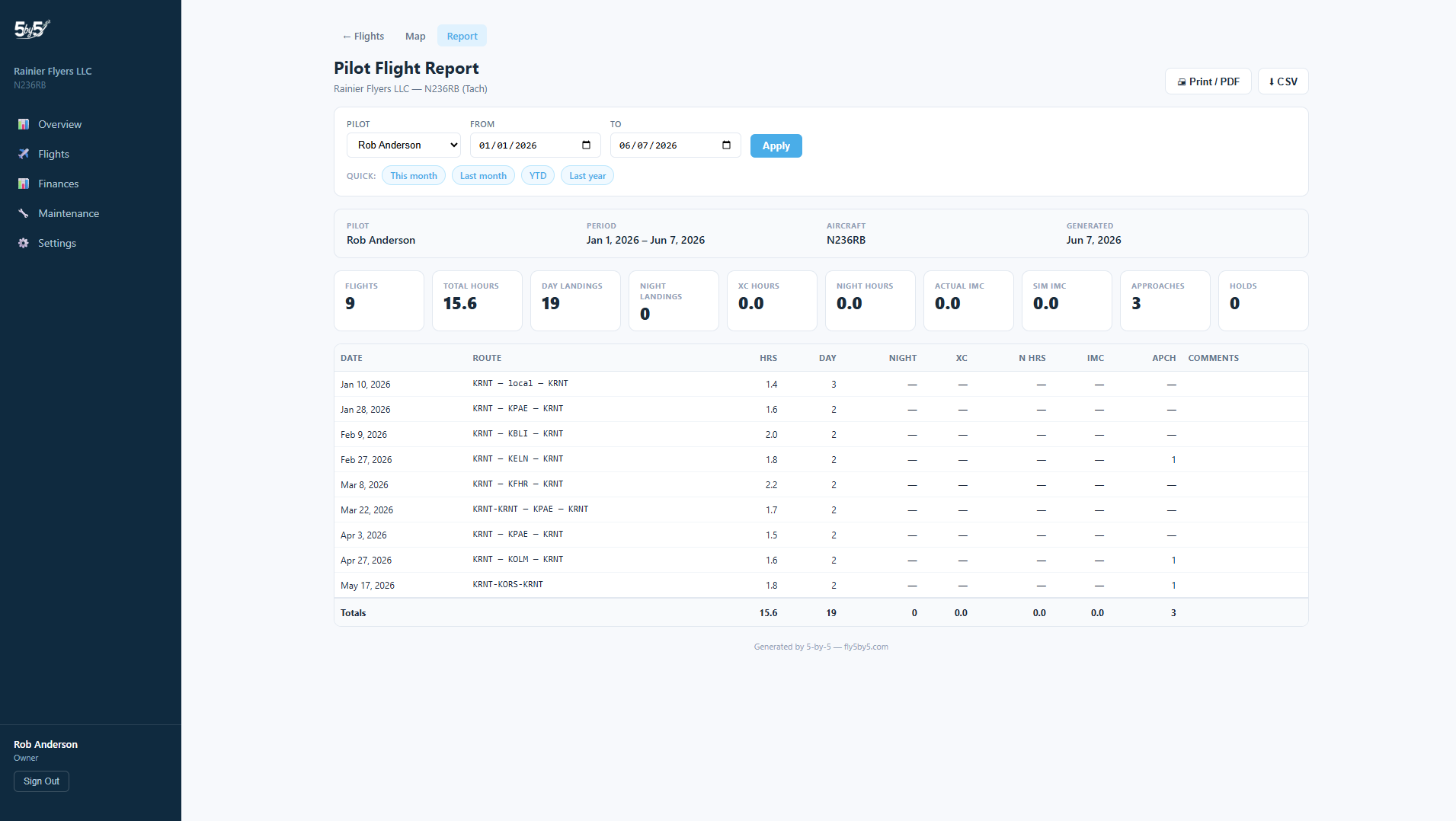
Filters at the top:
- Pilot — pick the pilot to report on. Owners and admins can pick any pilot or “All”; non-admins are locked to their own report.
- Date range — same quick presets as the Map, or set custom from/to dates.
The report itself:
- Ten summary cards at the top: Flights, Total Hours, Day Landings, Night Landings, XC Hours, Night Hours, Actual IMC, Sim IMC, Approaches, and Holds for the selected period
- A detailed flight table with every flight in the range and row totals at the bottom
Two export options at the top of the report:
- Print / PDF — opens your browser’s print dialog with print-optimised CSS that strips the sidebar and dashboard chrome; choose “Save as PDF” to save a clean printable copy
- CSV — downloads all 18 flight columns (date, pilot, route, hours, tach in/out, landings, IMC, approaches, fuel, oil, comments, and more) as a UTF-8 CSV that opens cleanly in Excel and Google Sheets
Importing Flight Data
Click the Import button at the top right of the Flights page to bring historical flight data in in bulk. The web dashboard auto-detects which of three formats you’ve handed it:
- Native 5-by-5 template — download an Excel (
.xlsx) file pre-populated with your group’s pilot names as a dropdown in the Pilot column and your aircraft tail in the filename. The template ships with two sample rows so you can see what’s expected: the first shows the minimum required data (date, pilot, tach out, tach in) and the second shows every available column populated so you can see what’s possible. Delete the sample rows, paste in your data, and import. Built-in cell validation catches bad dates and unknown pilot names before they reach the importer. - ForeFlight Logbook Export — the CSV ForeFlight produces from Logbook → Export. 5-by-5 auto-detects the ForeFlight format and pulls the Flights table directly. The import auto-filters to your group’s aircraft tail, so a multi-aircraft logbook only brings in the flights that belong to this group.
- Garmin Pilot Logbook Export — same idea, auto-detected by Garmin Pilot’s column naming, with the same aircraft-tail filter.
ForeFlight and Garmin Pilot — the two leading EFBs in the US market — are supported natively today. OzRunways and AvPlan (the two leading EFBs in Australia) are on the roadmap. If you’re an Australian pilot waiting on this, drop us a line at support@blueskyapplications.com and we’ll prioritise.
Pilots not yet in your group
If your import includes flights logged by pilots who aren’t members of the group yet, the importer doesn’t reject them. For each unrecognised pilot name it creates a placeholder member — a profile that sits in your roster, carries the imported flights, and waits to be claimed. Useful for:
- Ingesting historical flights before everyone in the group has signed up to the app
- Preserving the flight records of a member who has left the group
- Importing a member’s full logbook in advance, then having them claim it when they join
Placeholder members:
- Carry the imported flights and any other imported data attributed to them
- Can’t sign in, book the aircraft, or do anything else until claimed — there’s no account behind them
- Don’t count toward your paid plan’s seat limit until claimed
When that pilot later signs up through a group invite, the join flow lists the placeholders in your group and asks “Is one of these you?” If they pick the matching placeholder, their real account claims it and every historical flight already attributed to that placeholder transfers cleanly to them — no manual re-assignment needed. At that point the seat count and billing update automatically.
Names don’t have to match exactly. The claim is a manual selection by the joining user from the placeholders shown, so a placeholder created from an import as Rob Anderson can be claimed by someone who signs up as Robert J. Anderson. The joiner is the one who knows which placeholder is theirs.
For full column reference, format details, the Tach Cascade behaviour on import, and the most common pitfalls, see Importing Data.
Exporting Your Data
Click Export CSV above the flight log to download all visible flights as a spreadsheet. The export respects any active filters, so you can export just one pilot’s flights or a specific date range.
The exported CSV uses the same column names as 5-by-5’s native import format — so an exported file can be re-imported with no friction if you ever need to migrate data into another group or rebuild after a mistake.
Tip: The CSV export is useful for importing flight data into other tools, sharing records with your accountant, insurance provider, or flying club board, or as a backup before any large bulk operation.
Asking AI About Flights
For complex questions across many flights, the AI Assistant is often faster than scrolling the log. Ask things like “How many cross-country hours have I logged this year?” or “What was my longest single flight in 2025?” — the assistant calculates against the flight log directly.
Related Pages
- Flight Logging — the mobile flight log screen with flight data prefill
- Pilot Currency — currency calculations from logged flights
- Importing Data — bulk-import historical flights from ForeFlight, Garmin Pilot, or a CSV