Web Dashboard Overview
The web dashboard gives owners and admins a full view of group finances, flight history, maintenance, settings, and more — optimized for a desktop browser.
What is the Web Dashboard?
The web dashboard is a companion to the mobile app, designed for a larger screen. While the app handles day-to-day flying — logging flights, booking time, checking currency — the dashboard is where you manage maintenance, financials, group settings, and the administrative side of things.
Access it at blueskyapplications.com/5-by-5/dashboard and log in with the same credentials you use on the mobile app. You’ll also be prompted for your MFA code to complete the sign in.
The web dashboard is available on paid plans (Solo and Club). Free tier users are not able to access it.
Overview Page
When you log in, you land on the Overview — a single-page summary of everything happening with your airplane.
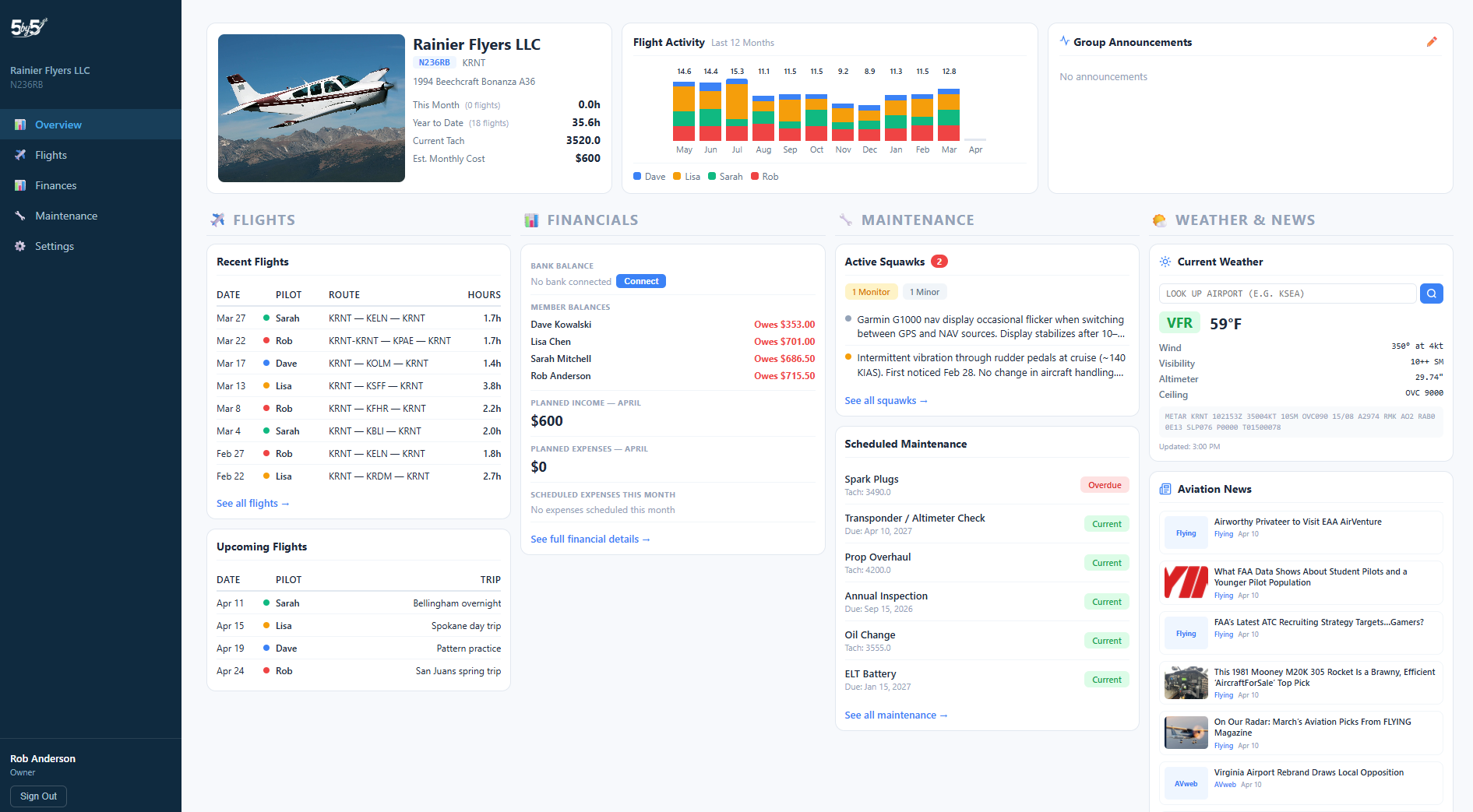
Aircraft Summary
At the top left: your aircraft photo, group name, tail number, home airport, and aircraft type. Below that, key stats:
- This Month — hours flown so far this month
- YTD Hours — total hours flown this year
- Current Tach — the latest logged tach reading
- Est. Monthly Cost — estimated cost for the current month based on hours and rates
Flight Activity Chart
A stacked bar chart showing the last 12 months of flight hours, broken down by pilot with color coding. Gives you a quick sense of who’s been flying and how activity has trended over time.
Group Announcements
A free-text area where Owners and Admins can post notes visible to all members when they log into the dashboard — useful for maintenance status, scheduling reminders, or anything the group needs to know.
Recent Flights
The 8 most recently logged flights with date, pilot, route, and hours. Tap any row to go to the full Flights page.
Upcoming Flights (Club plans)
The next 5 bookings from the group calendar with dates and member color coding.
Financials Summary (Club plans)
A quick snapshot of the current month’s financial picture:
- Bank Balance — live balance from your connected bank account (enabled through Plaid integration)
- Member Balances — who owes and who has a credit, with Update pending badges next to any member with an in-flight ACH payment
- Planned Income — projected charges for the current month
- Planned Expenses — scheduled expenses for the current month
Maintenance Summary
- Active Squawks — count by severity (Grounding, Monitor, Minor) with a brief description of each
- Scheduled Maintenance — top items by status (Overdue, Due Soon, Current)
Weather
Live METAR data for your home airport. Search for any airport by code to check conditions elsewhere.
Aviation News
A curated feed of aviation news, loaded on login.
Navigating the Dashboard
The left sidebar has these main sections:
- Overview — the summary page described above
- Flights — flight charts, stats, and the full log with FlightAware data
- Maintenance — Gantt timeline, squawks, oil analysis, component tracking, and documents
- Finances — member billing, planned expenses, bank transactions, and the ledger (Club plans)
- Settings — everything in the mobile Settings, plus the administrative editors that are view-only on mobile (sales tax authorities, Stripe Connect onboarding, payment configuration, ledger setup). Member roles and titles are managed here too — there’s no separate Members nav item. The larger screen makes bulk editing easier.
iPad-Friendly Layout
The dashboard is built for desktop and laptop browsers first. It opens on an iPad and the core data is readable, but the layout isn’t fully optimised for tablet widths yet — some pages (notably the Finances cash flow chart and the Maintenance Gantt timeline) need a screen 1200px wide or wider to render comfortably, and touch-target sizing across the dashboard hasn’t been tuned for tablets. Proper iPad / tablet responsiveness is on the roadmap. Until it lands, expect the cleanest experience on a desktop browser; if you’re on an iPad, a wireless mouse or Magic Keyboard helps.
Session and Authentication
Your dashboard session times out after a period of inactivity. When it does, the next thing you do will send you back to the sign-in page rather than throwing an inline error; sign in again and you’ll land back on the dashboard. Work in progress on the page you were on at the time of timeout is lost, so save often during long edits (e.g., Post Bills review).
Related Pages
- Mobile App Home Screen — the matching mobile view
- Flights (Web)
- Maintenance (Web)
- Finances
- Bank Integration (Plaid)
- Online Payments