Solo Mode
How 5-by-5 works for single-owner pilots on the Solo plan.
What is Solo Mode?
Solo mode is designed for pilots who own or operate an aircraft by themselves — no co-owners, no club members, just you and your airplane. Everything in 5-by-5 that makes sense for a single pilot is included; features that only apply to group coordination (scheduling, member billing, shared expenses) are simply hidden so they don’t clutter your experience.
Solo is a full-featured plan. It is not a stripped-down version of the product.
What’s Included
| Feature | Solo Free | Solo (paid) |
|---|---|---|
| Flight logging | ✓ | ✓ |
| Flight data prefill (ADS-B + FA) | — | ✓ |
| Maintenance tracking | Up to 5 items | Unlimited |
| Pilot currency | Basic | Full (with expiry dates, IPC, grace periods) |
| Squawk reporting | ✓ | ✓ |
| Squawk photos | — | ✓ |
| Tach cascade management | — | ✓ |
| AD auto-import | — | ✓ |
| Documents Library | — | ✓ |
| AI Assistant (Ask AI) | — | ✓ |
| EFB integration (ForeFlight, Garmin Pilot) | ✓ | ✓ |
| Calendar sync (device) | — | ✓ |
| A&P mechanic access | — | ✓ |
| Web dashboard | — | ✓ |
| Multi-factor authentication | ✓ | ✓ |
| Historical flight import | — | ✓ |
Scheduling, group billing, member ledger, online payment collection, and member management are not included in Solo — those are Club-only features.
The Solo Home Screen (Mobile App)
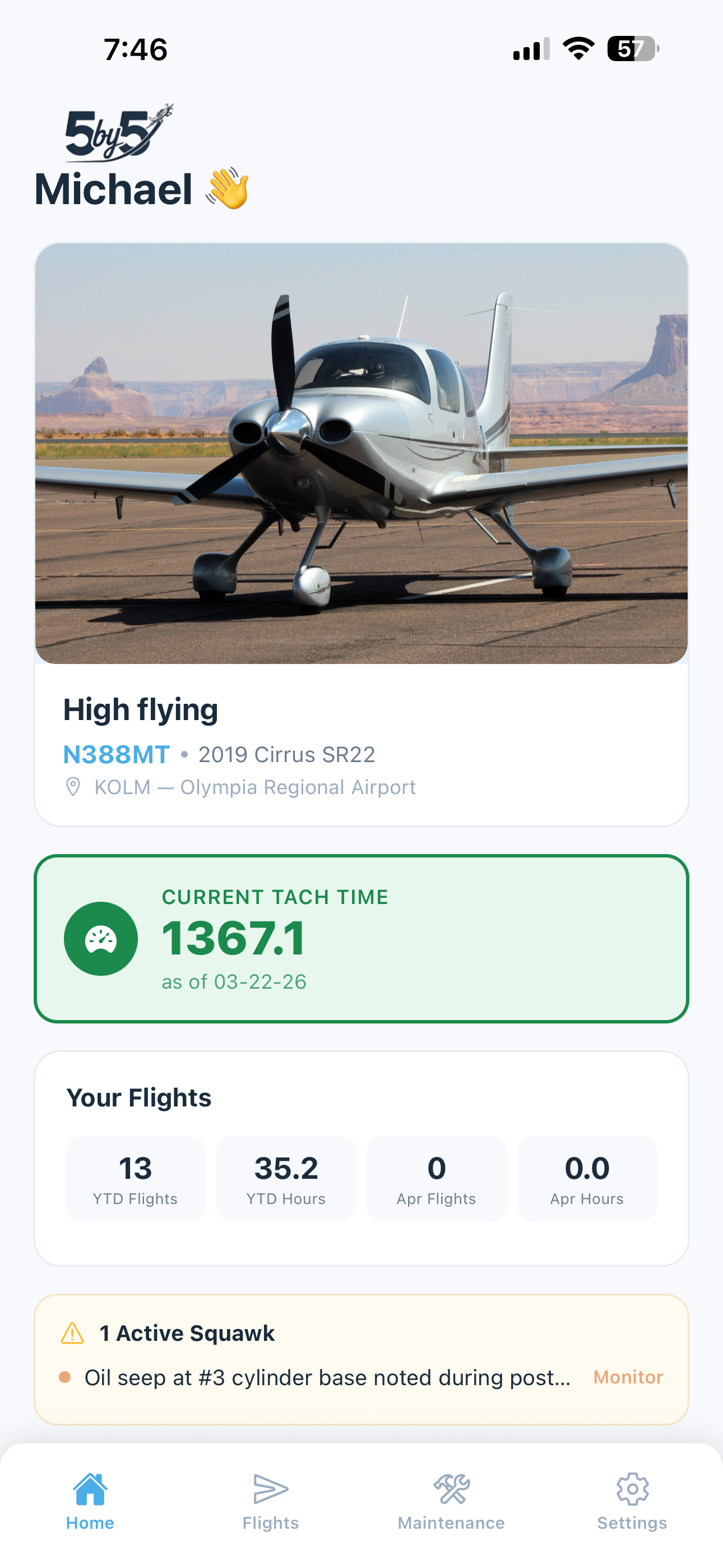
The home screen in Solo mode is streamlined. You’ll see:
- Your aircraft header with photo and tach reading
- Grounding squawk banner (if applicable)
- Maintenance alerts for items due soon or overdue
- Your personal flight stats (YTD flights, YTD hours, this month)
- Estimated monthly bill (if you’ve set an hourly rate in Settings)
- Weather widget for your home airport
- Pilot currency status
- Quick action buttons
The Upcoming Flights and Member Balances sections are hidden — those are group features.
Flight Logging (Mobile App)
Flight logging works identically to Club mode. You enter your tach times, route, landings, and any squawks. On the paid Solo plan, two enhancements make this faster:
- Flight data prefill — tap Prefill flight data in the log form and 5-by-5 pulls your flight’s route, landings, and an estimated tach-in (flight time + 0.2 hr for taxi/run-up) from public ADS-B feeds (primary) or FlightAware (fallback for older flights). You only need to confirm or edit before saving.
- Tach cascade management — each new flight pre-fills tach-out from the previous tach-in, so you only enter the new ending tach.
See Flight Logging for full details.
Maintenance (Mobile App)
Maintenance tracking is fully available on the paid Solo plan with no item limits. You can:
- Track maintenance items by tach hours, calendar date, or both
- Log completions with notes and tach readings
- Import Airworthiness Directives (ADs) automatically from the FAA Federal Register
- Access the Documents Library (POH, manuals, service bulletins, and your own uploaded documents)
- Report and resolve squawks with optional photos and resolution notes
The paid Solo plan is the only plan that includes AD auto-import and the Documents Library without also requiring a Club subscription.
See Maintenance Tracking for full details.
Adding an A&P Mechanic (Paid Solo)
On the paid Solo plan, you can give your A&P or IA access to your maintenance records without giving them access to your flights or billing. The mechanic also receives email alerts whenever you file a new squawk, so they’re informed as soon as a discrepancy is reported. See Members & Roles > A&P Mechanic Access and Squawk Reporting for details.
Pilot Currency (Mobile App)
Pilot currency tracking is fully available on the paid Solo plan, including:
- Day and night passenger-carrying currency
- IFR currency with instrument approaches and holds
- IPC (Instrument Proficiency Check) date tracking
- Medical certificate expiration
- Flight review (BFR) tracking
On the free Solo plan, currency shows as current or not current without expiry date details.
See Pilot Currency for full details.
AI Assistant (Paid Solo)
Tap the Ask AI tab to chat with an assistant that understands your aircraft and your records. Common Solo-pilot use cases:
- “What’s the hot start procedure for my airplane?” — looked up in your POH
- “How much have I spent on fuel this year?” — calculated from logged fuel costs and ledger entries
- “What maintenance is coming up in the next month?” — pulled from your maintenance tracker
- “What’s the right power setting for 65% power at 9,000 ft at 2300 RPM and standard temperature?” — extracted from POH performance tables
See AI Assistant for full details.
EFB Integration (All Solo plans)
Open any airport or route directly in ForeFlight Mobile or Garmin Pilot with one tap. The feature is available on both free and paid Solo plans — there’s no subscription gate on the EFB integration.
See EFB Integration.
The Web Dashboard (Paid Solo)
Solo paid subscribers have full access to the web dashboard at the same URL as Club users. Your dashboard includes:
- Overview — aircraft summary, recent flights, open squawks, maintenance alerts
- Flights — detailed flight log with charts and stats
- Maintenance — Gantt timeline, oil analysis tracking, component time tracking, documents
The Finances tab is present but primarily useful if you’ve set an hourly rate and want to track your own estimated costs over time. The member ledger and group billing features are not applicable on Solo.
See The Web Dashboard for full details.
What Solo Doesn’t Include
To keep the Solo experience clean, these Club-only features are hidden:
- Scheduling / calendar — no shared booking system
- Member roles and invites — there’s only you
- Group billing and ledger — no monthly bill posting workflow
- Online payment collection via Stripe Connect — used by clubs to collect from members; not applicable to solo
- Member balances on the home screen — there are no other members
If you start sharing the airplane with a co-owner, you can upgrade from Solo to Club — see Switching from Solo to Club below.
Switching from Solo to Club
If you take on a co-owner or join a club, you can upgrade from Solo to a Club plan. Your existing flights, maintenance records, and aircraft data carry over completely. You’ll be prompted to add members and configure group settings after upgrading.
Contact support@blueskyapplications.com if you need help migrating from a Solo account to a Club.
Starting a Second Group or Account
If you have a Solo account and later want to add a Club account (or vice versa) — for example, you join a flying club while still maintaining your solo aircraft — you don’t need a second login. From the Settings screen, tap Create New Group or Solo Account and follow the setup wizard. Your personal information (name, contact details, emergency contact, certificates, and ratings) carries over automatically.
See Settings for details on managing multiple groups.